Showing posts with label facebook. Show all posts

Friday, December 7, 2012

Updated Latest facebook chat code : Facebook Chat Window Tips and Tricks code

Updated Latest facebook chat Window code Are Here These Code is Prefectly Working on your facebook chat window how to use facebook chat code : just copy any code and Paste it in friends chat window which friends you want to share this Latest facebook Emoticons Posted Soon with your keep Regular visit... Last Time I Share with you how to update your status in Blue Color..

Read Also: 

Some old And Work Facebook window chat code
De Niro You Talking To Me
You talkin' to me?
Copy the emoticon code to facebook chat:


Bullet holes chat code
Bullet holes
Copy the emoticon code to facebook chat:


WTF Facebook Chat Emoticon
WTF Emoticon
Copy the emoticon code to facebook chat:


So What facebook emoticon
So What
Copy the emoticon code to facebook chat:


Keep Calm And Gangnam Sytle Picture Symbol For Facebook Chat
Keep Calm And Gangnam Style
Copy the emoticon code to facebook chat:


Dr House lupus emoticon
Dr. House
Copy the emoticon code to facebook chat:

Jim Morrison Stencil Emoticon
Jim Morrison
Copy the emoticon code to facebook chat:


Bob Marley Emoticon Drawing
Bob Marley
Copy the emoticon code to facebook chat:


Sparrow Depp
Captain Sparrow (Johnny Depp)
Copy the emoticon code to facebook chat:


Gotye feat. Kimbra drawing for facebook chat
Gotye & Kimbra Emoticon
Copy the emoticon code to facebook chat:


Good Night Sweet Dreams Emoticon
Good Night, Sweet Dreams
Copy the emoticon code to facebook chat:


Talk to the hand
Talk to the hand
Copy the emoticon code to facebook chat:


Beautiful Inside and out
Beautiful inside and out
Copy the emoticon code to facebook chat:


Thank You Emoticon Clip Art For Facebook
Thank You Emoticon
Copy the emoticon code to facebook chat:


Peace Sign Facebook Emoticon
Peace Sign
Copy the emoticon code to facebook chat:


Facebok Butterflies Emoticon
Releasing Butterflies
Copy the emoticon code to facebook chat:

Author:Jatin Baliyan is founder and webmaster of Arenamzza.org. You can follow me on Twitter, Facebook and on Google Plus..


Saturday, September 1, 2012

Make a Pop-up Subscribe Form Like Aweber

aweber subscribe form
This is my first Guest Article For The Blog And My Blogging Carrier Too..
First Of All Let Me Thank Mohammad Mustafa Sir to allow me to Post this article for you all. Have you ever heard about the Aweber Email Marketing Solutions ? If Not then i bet you must have seen EMail Signup Forms in Popular websites... They use Aweber. Though it is not free but it is efficient so they use that. But here In My Article I'll Let you to integrate Aweber Features and FeedBurner Features and install it on your Blog. So keep Reading And Keep Enjoying !!

What Will we Get From This ?

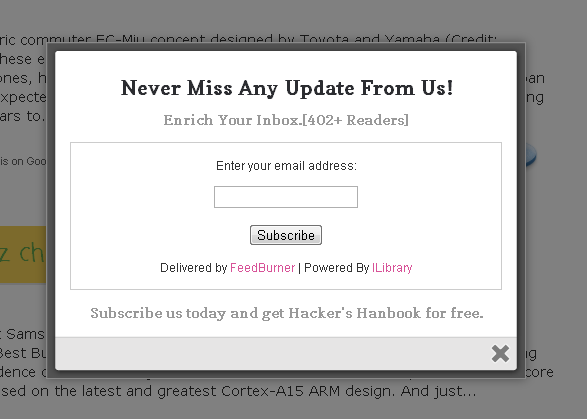
The main Reason why to use is because it will not only make your Blog Look Professional But Also will increase the EMail Subscriptions to your Blog. Its a modified version of the model subscribe box created by franklin. Lets first see a demo

Add it To Blogger

You can Install This Widget Easily in your Blog By Following These Simple Steps....
Before you edit any template it's better to keep a Backup..
So First Backup your Template. Now Go To Design>Edit Html>Select Expand Widgets...

Step 1 : The CSS You Need To Search The Following Piece Of Code By Pressing [Ctrl+F]
]]></b:skin>
Now Paste The Bellow Code Just Before it.
/*
   ColorBox Core Style:
   The following CSS is consistent between example themes and should not be altered.
*/
#colorbox, #cboxOverlay, #cboxWrapper{position:absolute; top:0; left:0; z-index:9999; overflow:hidden;}
#cboxOverlay{position:fixed; width:100%; height:100%;}
#cboxMiddleLeft, #cboxBottomLeft{clear:left;}
#cboxContent{position:relative;}
#cboxLoadedContent{overflow:auto;}
#cboxTitle{margin:0;}
#cboxLoadingOverlay, #cboxLoadingGraphic{position:absolute; top:0; left:0; width:100%;}
#cboxPrevious, #cboxNext, #cboxClose, #cboxSlideshow{cursor:pointer;}
.cboxPhoto{float:left; margin:auto; border:0; display:block;}
.cboxIframe{width:100%; height:100%; display:block; border:0;}
/*

    User Style:
       Change the following styles to modify the appearance of ColorBox.  They are
       ordered & tabbed in a way that represents the nesting of the generated HTML.
    */
    #cboxOverlay{background:#000;opacity:0.5 !important;}
    #colorbox{
            box-shadow:0 0 15px rgba(0,0,0,0.4);
           -moz-box-shadow:0 0 15px rgba(0,0,0,0.4);
            -webkit-box-shadow:0 0 15px rgba(0,0,0,0.4);
           }
          #cboxTopLeft{width:14px; height:14px; background:url(https://blogger.googleusercontent.com/img/b/R29vZ2xl/AVvXsEh8DMGla8SLj6qSVPYE3nFcXQRJmWP7WPo63jQwJfHKE9RulMO3bRFZ89YYnC6g1WEOYZEDt8nKTbieTdIJPjwk6x9KHi_7Ys95-AIdLeSZKYpHXQcldmdDuFsvHM_2byB2sdnBPBBblxw/s1600/controls.png) no-repeat 0 0;}
#cboxTopCenter{height:14px; background:url(https://blogger.googleusercontent.com/img/b/R29vZ2xl/AVvXsEgpF7dor4Fu48NrxcIhTHDC9gAmHAYPErSmTeEHMvddnG-GDF_RaGcfIfL4V1oF0K-h0hV9rYuTVIBhohRQBmcYEnHNfMGwcYXVCDRUkmhNcPhYRdkQ5RPGgCB9F0RMNs-4r-VnVTbgN0Y/s400/border.png) repeat-x top left;}
    #cboxTopRight{width:14px; height:14px; background:url(https://blogger.googleusercontent.com/img/b/R29vZ2xl/AVvXsEh8DMGla8SLj6qSVPYE3nFcXQRJmWP7WPo63jQwJfHKE9RulMO3bRFZ89YYnC6g1WEOYZEDt8nKTbieTdIJPjwk6x9KHi_7Ys95-AIdLeSZKYpHXQcldmdDuFsvHM_2byB2sdnBPBBblxw/s1600/controls.png) no-repeat -36px 0;}
    #cboxBottomLeft{width:14px; height:43px; background:url(https://blogger.googleusercontent.com/img/b/R29vZ2xl/AVvXsEh8DMGla8SLj6qSVPYE3nFcXQRJmWP7WPo63jQwJfHKE9RulMO3bRFZ89YYnC6g1WEOYZEDt8nKTbieTdIJPjwk6x9KHi_7Ys95-AIdLeSZKYpHXQcldmdDuFsvHM_2byB2sdnBPBBblxw/s1600/controls.png) no-repeat 0 -32px;}
    #cboxBottomCenter{height:43px; background:url(https://blogger.googleusercontent.com/img/b/R29vZ2xl/AVvXsEgpF7dor4Fu48NrxcIhTHDC9gAmHAYPErSmTeEHMvddnG-GDF_RaGcfIfL4V1oF0K-h0hV9rYuTVIBhohRQBmcYEnHNfMGwcYXVCDRUkmhNcPhYRdkQ5RPGgCB9F0RMNs-4r-VnVTbgN0Y/s400/border.png) repeat-x bottom left;}
    #cboxBottomRight{width:14px; height:43px; background:url(https://blogger.googleusercontent.com/img/b/R29vZ2xl/AVvXsEh8DMGla8SLj6qSVPYE3nFcXQRJmWP7WPo63jQwJfHKE9RulMO3bRFZ89YYnC6g1WEOYZEDt8nKTbieTdIJPjwk6x9KHi_7Ys95-AIdLeSZKYpHXQcldmdDuFsvHM_2byB2sdnBPBBblxw/s1600/controls.png) no-repeat -36px -32px;}
    #cboxMiddleLeft{width:14px; background:url(https://blogger.googleusercontent.com/img/b/R29vZ2xl/AVvXsEh8DMGla8SLj6qSVPYE3nFcXQRJmWP7WPo63jQwJfHKE9RulMO3bRFZ89YYnC6g1WEOYZEDt8nKTbieTdIJPjwk6x9KHi_7Ys95-AIdLeSZKYpHXQcldmdDuFsvHM_2byB2sdnBPBBblxw/s1600/controls.png) repeat-y -175px 0;}
    #cboxMiddleRight{width:14px; background:url(https://blogger.googleusercontent.com/img/b/R29vZ2xl/AVvXsEh8DMGla8SLj6qSVPYE3nFcXQRJmWP7WPo63jQwJfHKE9RulMO3bRFZ89YYnC6g1WEOYZEDt8nKTbieTdIJPjwk6x9KHi_7Ys95-AIdLeSZKYpHXQcldmdDuFsvHM_2byB2sdnBPBBblxw/s1600/controls.png) repeat-y -211px 0;}
    #cboxContent{background:#fff; overflow:visible;}
        #cboxLoadedContent{margin-bottom:5px;}
        #cboxLoadingOverlay{background:url(https://blogger.googleusercontent.com/img/b/R29vZ2xl/AVvXsEg2a8Rk-qkq9cd01KxqOuUX9tzM-btwY4cBIXUhtPPJ-UVeM0I1P5tMZtqHrRregJA-lv4V2Yxta7THD1OmqFbAV3UzODg9y7ONKKUOMe4zLizMj1T7VK6-M8S3XDf3waH5rxV8HwgcVaY/s400/loadingbackground.png) no-repeat center center;}
        #cboxLoadingGraphic{https://blogger.googleusercontent.com/img/b/R29vZ2xl/AVvXsEhDqCsiBLCgS9mwtnmrCG3xipSayuAYBUIWq6MI-MzMEi0VWr4BDKWgX1SzCPP7BZlLKRIFhzyxjQU0CNBGb-Nq_tyL7xZnNd-34fpGAgo58spFA8A6gcxDaDIcrkhpvyb2D8bLRQjOZyU/s400/loading.gif) no-repeat center center;}
        #cboxTitle{position:absolute; bottom:-25px; left:0; text-align:center; width:100%; font-weight:bold; color:#7C7C7C;}
        #cboxCurrent{position:absolute; bottom:-25px; left:58px; font-weight:bold; color:#7C7C7C;}
        #cboxPrevious, #cboxNext, #cboxClose, #cboxSlideshow{position:absolute; bottom:-29px; background:url(https://blogger.googleusercontent.com/img/b/R29vZ2xl/AVvXsEh8DMGla8SLj6qSVPYE3nFcXQRJmWP7WPo63jQwJfHKE9RulMO3bRFZ89YYnC6g1WEOYZEDt8nKTbieTdIJPjwk6x9KHi_7Ys95-AIdLeSZKYpHXQcldmdDuFsvHM_2byB2sdnBPBBblxw/s1600/controls.png) no-repeat 0px 0px; width:23px; height:23px; text-indent:-9999px;}
        #cboxPrevious{left:0px; background-position: -51px -25px;}
        #cboxPrevious.hover{background-position:-51px 0px;}
        #cboxNext{left:27px; background-position:-75px -25px;}
        #cboxNext.hover{background-position:-75px 0px;}
        #cboxClose{right:0; background-position:-100px -25px;}
        #cboxClose.hover{background-position:-100px 0px;}
        .cboxSlideshow_on #cboxSlideshow{background-position:-125px 0px; right:27px;}
        .cboxSlideshow_on #cboxSlideshow.hover{background-position:-150px 0px;}
        .cboxSlideshow_off #cboxSlideshow{background-position:-150px -25px; right:27px;}
        .cboxSlideshow_off #cboxSlideshow.hover{background-position:-125px 0px;}

/*-----------------------------------------------------------------------------------*/
/*    box popup
/*-----------------------------------------------------------------------------------*/
#subscribe {
    font: 12px/1.2 Arial,Helvetica,san-serif;
}
#subscribe a,
#subscribe a:hover,
#subscribe a:visited {
    text-decoration:none;
}
.box-title {
   color: #2C2D31;
   font-size: 20px;
   font-weight: bold;
   margin: 10px 0;
   text-align: center;
}
.box-tagline {
   color: #999;
   font-size: 14px;
   margin: 0;
   text-align: center;
}
#subs-container {
    padding: 35px 0 30px 0;
    position: relative;
}
.box-side {
    width: 170px;
    text-align: center;
}
.box-side.left {
   padding: 0 30px 0 15px;
    border-right: 1px solid #ecedf3;
}
.box-side.right {
    float: right;
   margin-top: -223px;
    margin-right: 10px;
}
.box-icon {
    width: 72px;
    height: 54px;
    padding: 6px 0 0 0;
    margin: 0 auto;
}
.box-icon a.rss{
    display: block;
    width: 70px;
    height: 56px;
    margin: 0 auto;
}
.box-icon a{
    display: block;
    width: 72px;
    height: 54px;
}
.box-icon a.email img,
.box-icon a.rss img {
   margin: -5px 0 0;
    border: 0 none;
}
.box-side h4,
.box-side h4 a {
    font-size: 14px;
    line-height: 14px;
    color: #f26535;
    font-weight: bold;
}
.box-side h4 { margin: 20px 0 10px 0; }
.box-side h5 {
    font-size: 11px;
    color: #5e6066;
    line-height: 18px;
    margin: 0 0 20px 0;
}
a.sub {
   background: url("http://imgboot.com/images/cybersidh/subscribebutton.png") no-repeat scroll 0 0 transparent;
   color: #996633;
   display: block;
   height: 44px;
   line-height: 29px;
   margin: 0 auto;
   text-indent: -999em;
   width: 130px;
}
.box-side h4 a:hover {
    color: #f26535;
}
#box-or {
   background: #fff;
   font-size: 12px;
   font-weight: bold;
   height: 25px;
   line-height: 25px;
   margin: -115px 0 0 208px;
   position: absolute;
   width: 20px;
}
a:link, a:visited {
border:none;
}
.demo {
display:none;
}

Now Hit Prievew, If Every Thing Works Fine then Save The Template.. 

Step 2 : The Html In This Part you'll add the widget to your Blog !! 
Goto :: Design>Page Elements>Add Gadget>Html/Javascript 
Now Paste The Following Code In It. 
<script src='http://ajax.googleapis.com/ajax/libs/jquery/1.5/jquery.min.js'></script>
<script src="http://sidharth12.googlecode.com/files/jquery.colorbox-min.js"></script>
<script type="text/javascript">
jQuery(document).ready(function(){
   if (document.cookie.indexOf('visited=true') == -1) {
       var fifteenDays = 1000*60*60*24*15;
       var expires = new Date((new Date()).valueOf() + fifteenDays);
       document.cookie = "visited=true;expires=" + expires.toUTCString();
   $.colorbox({width:"480px", inline:true, href:"#subscribe"});
       }
});
</script>
    <!-- This contains the hidden content for inline calls -->
    <div style='display:none'>
        <div id='subscribe' style='padding:10px; background:#fff;'>
        <h2 class="box-title">Never Miss Any Update From Us!</h2>
               <h2 class="box-tagline">Enrich Your Inbox.[402+ Readers]</h2><br/>
               <form style="border:1px solid #ccc;padding:3px;text-align:center;" action="http://feedburner.google.com/fb/a/mailverify" method="post" target="popupwindow" onsubmit="window.open('http://feedburner.google.com/fb/a/mailverify?uri=ILibrary', 'popupwindow', 'scrollbars=no,width=560,height=540');return true"><p>Enter your email address:</p><p><input type="text" style="width:140px" name="email"/></p><input type="hidden" value="ILibrary" name="uri"/><input type="hidden" name="loc" value="en_US"/><input type="submit" value="Subscribe" /><p>Delivered by <a href="http://feedburner.google.com" target="_blank">FeedBurner</a> | Powered By <a href="http://adf.ly/CU0f1">Get This widgets</a></p></form>
        <br/><h2 class="box-tagline">Subscribe us today and get Quality Articles for free.</h2>
</div>
</div>

Important : 
Remove The Red Colored ILibrary With You FeedBurner ID. 
Ignore The Line In Pink If Your Blog Already has JQuery. 

Monday, August 27, 2012

Top List Of All Best Facebook Tricks And Tips And Update 2012 By Arenamazza - Facebook Tips And Tricks - Cool Tricks Of Facebook


Hello To All Friend we always have been sharing some really best facebook tips and tricks on arenamazza but today i though to share a list of all best facebook tricks and update for 2012.yes as the year 2012 arrived ,facebook rolled out some really great changer and made it reall user friendly by bringing new functions into it.


So Let's us start and have a glance at list of all best facebook tricks and update of 2012.


Top List Of All Best Facebook Tricks and tips And Update Of 2012


 I Hope You Enjoyed All Tricks And Tips.

And now it's your turn to share your views.

Thursday, August 23, 2012

How To Make Rage Faces And Send on Facebook Chat


Simply type the above code that corresponds to the appropriate rage face into Facebook chat, and the image of the rage face you chose will appear, emoticon-like in its existence. Facebook didn’t suddenly become hip to the Internet and add rage face emoticons (something from which Google Chat would greatly benefit), but the ability to add rage faces to Facebook chat is more of a hack than anything else, and something to which you can add.
explains that these aren’t actually some form of ragemoticon, but that the double bracket and code corresponds to a user profile or page, and when put into Facebook chat, will show the thumbnail of the profile or page that the code links to.
So, all one has to do to make any picture a Facebook chat emoticon, is to simply create a user profile or page that uses the desired picture as the profile picture, then enter the double brackets and corresponding code into Facebook chat. Here’s a tidy list of some more rage face codes:
  • Troll face: [[171108522930776]]
  • ARE YOU FUCKING KIDDING ME: [[143220739082110]]
  • Not bad Obama: [[169919399735055]]
  • Me Gusta: [[211782832186415]]
  • Mother of God: [[142670085793927]]
  • Cereal Guy: [[170815706323196]]
  • LOL Face: [[168456309878025]]
  • NO Guy: [[167359756658519]]
  • Yao Ming: [[218595638164996]]
  • Derp: [[224812970902314]]
  • Derpina: [[192644604154319]]
  • Forever Alone: [[177903015598419]]
  • Not Bad: [[NotBaad]]
  • Fuck yeah: [[105387672833401]]
  • Challenge accepted: [[100002727365206]]
  • Okay face: [[100002752520227]]
  • Dumb bitch: [[218595638164996]]
  • Poker face: [[129627277060203]]
  • Okay face: [[224812970902314]]
  • Socially awkward penguin: [[98438140742]]
  • Rage face: [[FUUUOFFICIAL]]
  • Lamp: [[100001256102462]]
  • No: [[167359756658519]]
  • MOG: [[142670085793927]]
  • Feel like a sir: [[168040846586189]]
  • Forever alone christmas: [[125038607580286]]
Happy raging.

Thursday, July 19, 2012

Pretty Facebook Chat with Emoticons, Bigger Chat Window and Text Size

Pretty Facebook chat is a free Google Chrome extension which shows your Facebook chat with installed Emoticons, Bigger size chat window, nice shadow and increased text size. You can also drag your chat window anywhere on the screen. With this extension your chat window will not longer be pinned at the bottom right side of the browser, you will be able to move it around anywhere on the screen.

Pretty Facebook chat is easy to use and access. You can also use different symbols and logo in your Facebook chat window.


You can also send and view animated figures and pictures of your friends example shown in below screenshot. Facebook chat window also becomes bigger in size but you can adjust the size of your chat window.


In addition, you can also drag your chat window and increase the text size of your words.


Key Features Of Pretty Facebook Chat:


  • Easy to drag.
  • You can increase the size of window.
  • You can adjust the shadow.
  • Increase your text size. 

  • Added emoticons and smileys.
  • You can also use symbols and logos.
  • Add profile pic of your friends.

How To Add Pretty Facebook Chat To Chrome Browser:

  • To add Pretty Facebook chat to your Chrome browser, click here.
  • Click on “Add To Chrome”
  • The Extension will be added to your Google Chrome browser.
  • You have to share its link on Facebook.
  • You also have to vote in Chrome store.
  • Then at last, It’s ready to use.
Pretty Facebook chat is a Google chrome extension which  is easy to use and access. This extension will help you to pass on your emotions to friends, family and colleagues in Facebook. New variety of symbols and logos are added to it.


Home Page: 
Click Here 
Download (Free): Click Here 
Works With: Google Chrome
Free / Paid: Free